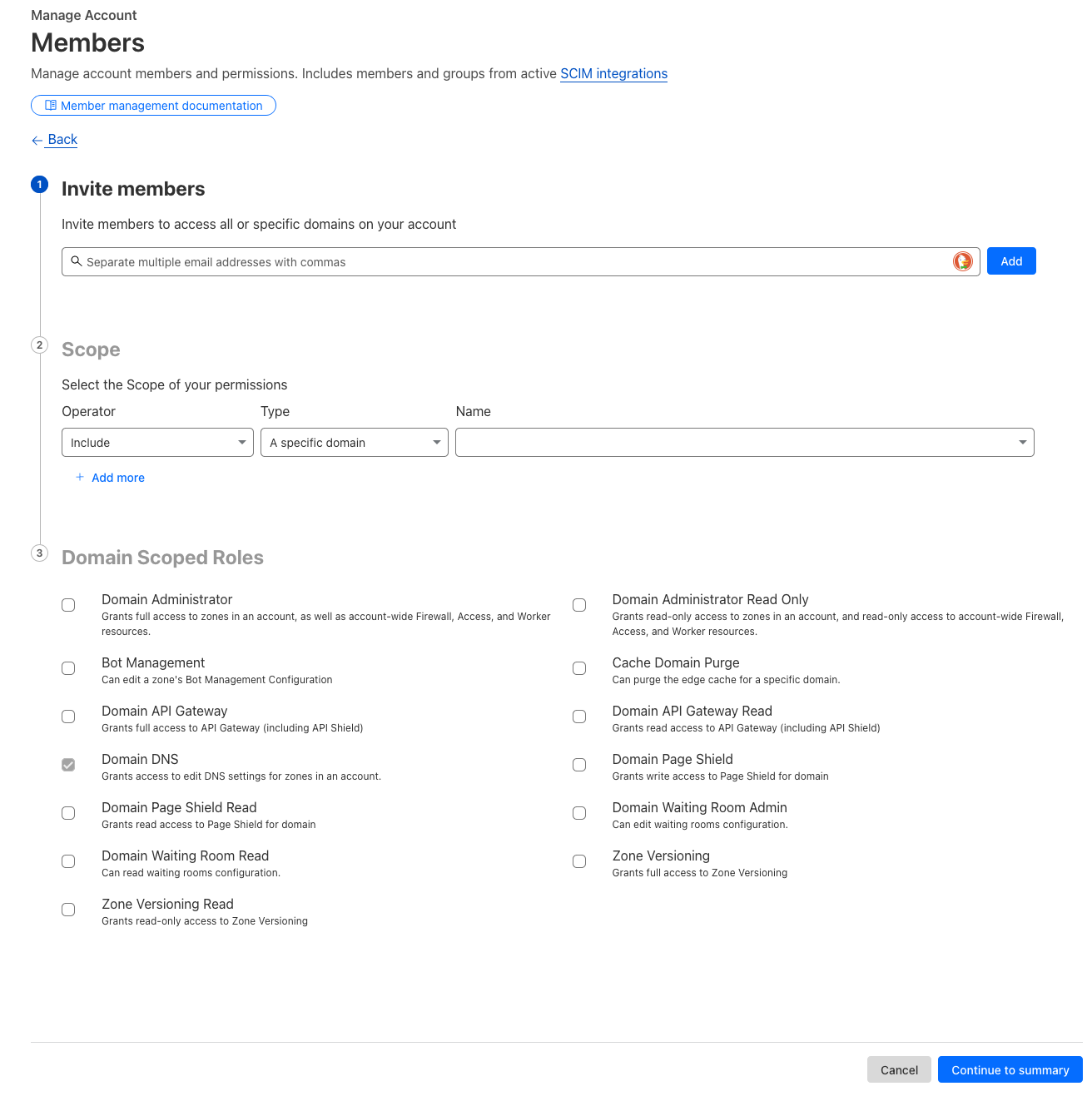
The best way to share access to a Cloudflare account is to add account members. This prevents us from having to share credentials, and leaves you in charge of everyone who has access to your account.
In order to provide access, please do the following:
- Log in to Cloudflare: Access the Cloudflare dashboard and log in to your account.
- Navigate to Members: Select the specific Cloudflare account you want to manage. Then, go to "Manage Account" and click on "Members".
- Invite New Members: Click the "Invite" button.
- Enter Email Address: Input the email address of the person you want to invite to the account. To provide access to Jub Jub, use cloudflare@jubjub.com.
- Configure Permissions:
- Scope: Determine whether the new member should have access to all domains (zones) on the account or a specific domain. Choose "Include", "A specific domain", and then select the domain you'd like to share access to in the "Name" dropdown.
- Roles: Select "Domain DNS".
- Review and Invite: After configuring permissions, review the settings and click "Invite".
- Accept Invitation: The invited user will receive an email with a link to accept the invitation. Once accepted, the user will be added to the Cloudflare account with the specified permissions.
See screenshot: